![[PukiWiki]](image/logo.gif "[PukiWiki]")
データの多いグラフで活躍する
データロガーの集計データのような膨大なデータをグラフにするのは、 結構大変だ。Excelでやろうとすると巨大なファイルになってしまい、 再表示や印刷に異常なほど時間がかかる。OpenOffice Calcでやろうとしたが、 日付や時刻の扱いがうまくできないのと、巨大なデータからグラフを作ろうとすると 恐ろしく不安定になるようなのであきらめた。
市販のグラフ専用ソフトだと巨大なデータでも問題なく処理してくれるのだろうが、 10万円前後といい値段だったりする。
どうせデータの前処理に perl だの awk だの必要になるので Debian GNU/Linux 4.0 で gnuplot を使ってやってみることになったが、これが癖があって使いにくい。
Debian 4.0 (etch) で Synaptic Package Manager に gnuplot を検索させる。 plotdrop という GNOME 環境でデータファイルをファイルマネージャからドロップ すればとりあえず動くアプリケーションがあるので、これを選択してインストール すれば、gnuplot も一緒にインストールされる。
x11に出力するときのサイズと色指定が面倒だ。
gnuplot -geometry 1200x512 -persist \
   -xrm "gnuplot*line1Color: red" \
   -xrm "gnuplot*line2Color: black" example.plt
というような指定をして、example.plt で
set title "Somewhere Temperature"
set xlabel "Date"
set ylabel "Celsius"
set xdata time
set timefmt "%s"
set format x "%y/%m/%d"
set grid
plot "somewhere.dat" using 1:2 with lines title "somewhere", \
     "somewhere.dat" using 1:2 smooth bezier notitle with lines
とやれば、ベジエ補間の線が緑から黒に変わる
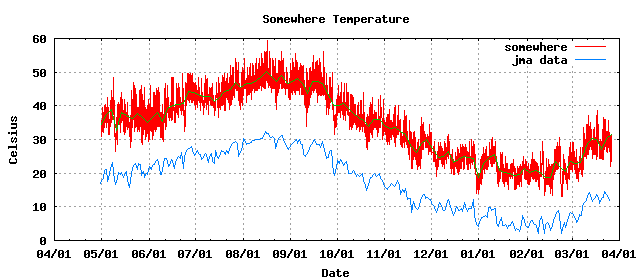
set terminal png size 640,280
set output "somewhere-temp-s.png"
set title "Somewhere Temperature"
set xlabel "Date"
set ylabel "Celsius"
set xdata time
set timefmt "%s"
set format x "%m/%d"
set grid
plot "somewhere.dat" using 1:2 title "somewhere" with lines, \
     "somewhere.dat" using 1:2 smooth bezier notitle with lines
日付と時刻は、予め perl で epoc day からの秒数に変換して から処理しているが、gnuplotで直接読み込むのも可能かもしれない。
#!/usr/bin/perl

use Class::Date qw(:errors date);

while (<>) {
    tr/\//-/;
    @a = split(' ');
    $date = date "$a[0] $a[1]";
    printf("%d %s\n", $date->epoch, $a[3]);
}
perlで Class::Date を使うために libclass-date-perl というパッケージを入れた。
set xrange ["05/01/07":"05/01/08"]


